



Architecting the content
We poured through the wireframes and designs provided by Milkshake Media to define all the content types, templates, and relationships (taxonomies). Once we had everything mapped out (Perspective Posts, People, Offices, Projects, Publications, Appearances, etc.) we leveraged Carrington Core to easily and logically build the various views to match the designs.
User integration
In many WordPress CMS implementations the “author” connection is used to define a relationship between a user and a post. For this site we had a much more robust set of rules to work within. These included pairing multiple team members with a project, but allowing marketing staff not associated with the project to actually create and edit the content. This required not only defining and maintaining the user/content relationships, but also implementing custom permissions that allowed users without an “Editor” role to make changes to content in specific areas.
Project Mapping
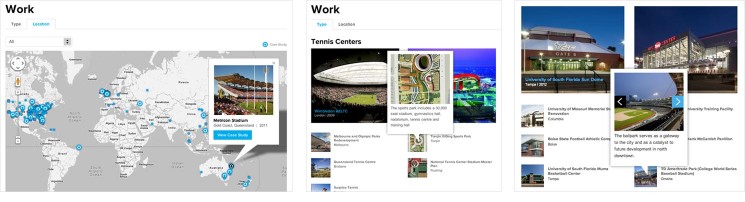
Populous is a multi-national firm working on interesting projects all over the world. As such, it was decided that an interactive map would be a great way to allow users to browse projects and case studies. Using the Google Maps API, we built a solution that translated the Project’s address into latitude/longitude and plotted a marker on a map. This marker includes details about the project including a photo slide-show drawn from the post’s gallery, and a link to the case-study (if applicable).
Drag and drop layouts
Some content calls for more than a standard template. In the case of the “Expertise” pages, we implemented Carrington Build to allow drag and drop layouts for custom content needs. We also implemented a custom vertical “tabbed box” Module. These features allow the page layouts to fit the unique and evolving content needs over time.
Create once, use elsewhere
As part of the content architecture and relationship definition, we designed and implemented mechanisms in WordPress to allow data to be defined in one place but used in more than one situation. For example, using WordPress “users” a “Team Member” profile can be created, but it can also be displayed on a “Team Member” post type, and selected from a “Team Member” taxonomy (such as when picking participants in a Project).
Creating relationships
Being able to associate content with other “things” allows the website to tell a cohesive story. For example, every Project has the ability to define “Team Members” that participated in it, just like public “Appearances” at conferences would. The Team Member’s profile can then show all their activity across the site’s content. We made this easily managable in WordPress for a number of content types: team members, offices, and areas of expertise.
Social media integrations
We integrated the Social plugin into various pages across the site in order to show reactions to content from Facebook and Twitter. Additionally we created API integrations with Flickr and Twitter to allow the Project and Office pages to dynamically display recent updates from those social networks.
Responsive and adaptive styles
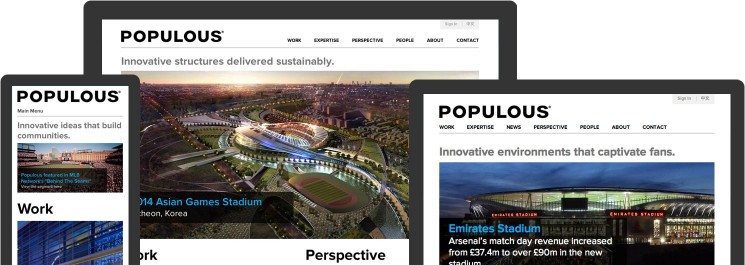
Working with Milkshake Media, we were able to suggest minor tweaks to their grid-based designs to leverage existing HTML5 and CSS-based responsive styles. With some simple media queries we quickly improved the browsing experience for mobile and tablet devices.
Branding, user experience and visual design provided by Milkshake Media